 Command

Sam Foreman's personal site. Vim-style keybinds for navigation; theme + font pickers below.

Theme
 Font Body Code
Reader
Keybinds
Navigation
j / ↓ Next item k / ↑ Previous item g First item in region G Last item in region zz Center focused item h / l Sidebar / main content ] / [ Next/previous heading } / { Next/previous block d / u Half-page down/up
Layout
<zh> Toggle sidebar <zr> Toggle reader view <zj> / <zk> Focus main / actions ⇧C / ⇧E  ·  <zM> / <zR> Collapse / expand all sections
Dialogs
⌃P / : Command palette ⌃X Theme picker / Search ? Show keybinds ⌃N / ⌃P Next/prev search result Esc Close dialog / exit reader
History
n Next document b Previous document ⌃O History back ⌃I History forward
Sections
a about p posts t talks m more s style
 Search
about/more: 🪪 More ideas: 💡 Ideas now: Now about: Sam Foreman posts: 📬 Posts more: ➕ More projects: 📚 Projects talks: 🎙️ Talks webtui: Style posts/2025: 📆 2025 posts/ai-for-physics: ⚛️ AI for Physics posts/auroragpt: 🤖 AuroraGPT posts/dope-slides: 💅 How to Make Dope Slides posts/jupyter: 📗 Jupyter posts/ezpz-at-alcf: 🍋 ezpz @ ALCF posts/resume: 🧑🏻‍💻 Sam Foreman’s Résumé posts/svgbob: 🫥 svgbob posts/ezpz-v1: 📝 ezpz-v1 posts/torchtune-patch-aurora: 🚑 Torchtune Patch on Aurora posts/torchtune-aurora: 🪛 Torchtune on Aurora talks/auroragpt-siam25: AuroraGPT talks/ai-for-science-2024: Parallel Training Methods talks/alcf-hpc-workshop-2024/alcf-hpc-workshop-2024: Deep Learning and Foundation Models at Scale talks/aurora-gpt-fm-for-electric-grid/auroragpt-fm-for-electric-grid: AuroraGPT: Foundation Models for Science talks/demo-slides: AuroraGPT: Training Foundation Models on Supercomputers talks/incite-hackathon-2025: ALCF Incite Hackathon 2025 talks/hpc-user-forum/auroragpt: AuroraGPT talks/llms-at-scale: Training LLMs at Scale talks/openskai25: Open SkAI2025 talks/llms-on-polaris: Training LLMs on Polaris webtui/contributing/contributing: Contributing webtui/contributing/contributing: ## Local Development webtui/contributing/contributing: ## Issues webtui/contributing/contributing: ## Pull Requests webtui/components/accordion: Accordion webtui/components/badge: Badge webtui/contributing/style-guide: Style Guide webtui/contributing/style-guide: ## CSS Units webtui/contributing/style-guide: ## Selectors webtui/contributing/style-guide: ## Documentation webtui/components/checkbox: Checkbox webtui/components/button: Button webtui/components/input: Input webtui/components/popover: Popover webtui/components/pre: Pre webtui/components/dialog: Dialog webtui/components/progress: Progress webtui/components/radio: Radio webtui/components/range: Range webtui/components/spinner: Spinner webtui/components/table: Table webtui/components/switch: Switch webtui/components/textarea: Textarea webtui/components/separator: Separator webtui/components/tooltip: Popover webtui/components/typography: Typography webtui/components/view: View webtui/installation/astro: Astro webtui/installation/astro: ## Scoping webtui/installation/astro: ### Frontmatter Imports webtui/installation/astro: ### ‹style› tag webtui/installation/astro: ### Full Library Import webtui/installation/nextjs: Next.js webtui/installation/vite: Vite webtui/plugins/plugin-dev: Developing Plugins webtui/plugins/plugin-dev: ### Style Layers webtui/plugins/plugin-nf: Nerd Font Plugin webtui/plugins/theme-catppuccin: Catppuccin Theme webtui/plugins/theme-custom: Custom Theme webtui/plugins/theme-everforest: Everforest Theme webtui/plugins/theme-gruvbox: Gruvbox Theme webtui/plugins/theme-nord: Nord Theme webtui/start/ascii-boxes: ASCII Boxes webtui/plugins/theme-vitesse: Vitesse Theme webtui/start/changelog: Changelog webtui/start/installation: Installation webtui/start/installation: ## Installation webtui/start/installation: ## Using CSS webtui/start/installation: ## Using ESM webtui/start/installation: ## Using a CDN webtui/start/installation: ## Full Library Import webtui/start/installation: ### CSS webtui/start/installation: ### ESM webtui/start/installation: ### CDN webtui/start/intro: Introduction webtui/start/intro: ## Features webtui/start/plugins: Plugins webtui/start/plugins: ## Official Plugins webtui/start/plugins: ### Themes webtui/start/plugins: ## Community Plugins webtui/start/theming: Theming webtui/start/theming: ## CSS Variables webtui/start/theming: ### Font Styles webtui/start/theming: ### Colors webtui/start/theming: ### Light & Dark webtui/start/theming: ## Theme Plugins webtui/start/theming: ### Using Multiple Theme Accents webtui/start/tuis-vs-guis: TUIs vs GUIs webtui/start/tuis-vs-guis: ## Monospace Fonts webtui/start/tuis-vs-guis: ## Character Cells posts/2025/06: 06 posts/ai-for-physics/l2hmc-qcd: 🎢 L2HMC for LQCD posts/auroragpt/aurora-gpt: 🏎️ Megatron-DeepSpeed on Intel XPU posts/auroragpt/checkpoints: 💾 Converting Checkpoints posts/auroragpt/flash-attn-sunspot: 📸 flash-attn on Sunspot posts/auroragpt/long-sequences: 🚂 Loooooooong Sequence Lengths posts/ai-for-physics/diffusion: 🎲 MCMC + Diffusion Sampling posts/auroragpt/spike-skipper: 🏔️ Spike Skipper posts/auroragpt/determinstic-flash-attn/deterministic-flash-attn: 🎰 Deterministic flash-attn posts/auroragpt/mpi4py-reproducer: 🐛 mpi4py bug on Sunspot posts/auroragpt/startup-times: 🐢 Starting Up Distributed Training on Aurora posts/auroragpt/startup-times: ## Response posts/auroragpt/startup-times: ### Measuring / Calculating Startup Time posts/auroragpt/startup-times: ## Minimal Working Example posts/jupyter/test: 🏁 l2hmc Example: 2D $U(1)$ talks/incite-hackathon-2025/auroragpt: LLMs on Aurora: Overview talks/auroragpt/alcf-hpc-workshop-2024/auroragpt-alcf-hands-on-hpc-workshop-2024: AuroraGPT: ANL's General Purpose Scientific LLM talks/incite-hackathon-2025/ezpz: LLMs on Aurora: Hands-On talks/openskai25/training: Scientific AI at Scale: Distributed Training talks/openskai25/ai4science: Scientific AI at Scale: AuroraGPT posts/2025/04/28: 🔥 Building PyTorch 2.6 from Source on Aurora posts/2023/12/05: 🔳 l2hmc-qcd Example: 4D SU(3) posts/2025/09/12: 🍹 BlendCorpus + TorchTitan @ ALCF posts/2025/09/17: 📊 pbs-tui: TUI for PBS Job Scheduler Monitoring posts/2025/05/03: 🚧 Frameworks Issue with numpy \› 2 posts/2025/06/01: 📰 Nice Headings posts/2025/06/02: 🧜‍♀️ Mermaid posts/2025/06/14: 🏗️ Building PyTorch 2.8 from Source on Aurora posts/2025/11/12: 🧊 Cooling Down Checkpoints: Best Practices for Model Evaluation posts/2025/10/06: 🎨 Mixing Between Distributions While Training posts/ai-for-physics/l2hmc-qcd/2du1: 🎢 l2hmc-qcd Example: 2D U(1) posts/2026/01/07: 🎉 Happy New Year! posts/2026/01/10: 🍋 ezpz: distributed PyTorch across any hardware posts/2026/04/27: Pre-Training AuroraGPT with TorchTitan posts/2026/04/27: ## Two-Week Summary (Apr 12–27, 2026) posts/2026/04/27: ## Detailed Breakdown posts/2026/04/27: ### Week 1: Apr 12–18 — Benchmarking, LR Finder, XPU Fixes posts/2026/04/27: #### Benchmarking (Apr 12–15) posts/2026/04/27: #### LR Finder (Apr 12–14) posts/2026/04/27: #### Scaling Study (Apr 12) posts/2026/04/27: #### Upstream Syncs (Apr 12–18, syncs 6–14) posts/2026/04/27: #### XPU Bug Fixes (Apr 18) posts/2026/04/27: #### RL Experiment (Apr 18) posts/2026/04/27: ### Week 1.5: Apr 18–25 — Production Readiness posts/2026/04/27: #### Torch 2.12 Benchmarks (Apr 18) posts/2026/04/27: #### LR Finder Extensions (Apr 20–21) posts/2026/04/27: #### XPU Fixes (Apr 23) posts/2026/04/27: #### Torch 2.13 Environment (Apr 25) posts/2026/04/27: #### 2B Scaling Study on Torch 2.13 (Apr 25) posts/2026/04/27: #### Production Training (Apr 25) posts/2026/04/27: ### Week 2: Apr 26–27 — Optimizer Competition posts/2026/04/27: #### RL Multi-Task Refactor (Apr 26) posts/2026/04/27: #### Docs Reorganization (Apr 26) posts/2026/04/27: #### Generic HF Dataset Streaming (Apr 26) posts/2026/04/27: #### New Optimizers (Apr 26) posts/2026/04/27: #### Architecture Tweaks (Apr 26–27) posts/2026/04/27: ## Competition Results posts/2026/04/27: ### Round 1–3: Speedrun — 2N, GBS=48, 1000 steps posts/2026/04/27: ### 10B Full Training — 8N, GBS=384, ~3,178 steps posts/2026/04/27: ### Round 4: Reproducible Speedrun — 2N, GAS=8, GBS=384, 1000 steps posts/2026/04/27: ## Key Discoveries posts/2026/04/27: ## Infrastructure Built posts/2026/04/27: ## High-Level posts/2026/04/27: ## Detailed Breakdown posts/2026/04/27: ### Week 1: Apr 12–18 — Benchmarking, LR Finder, XPU Fixes posts/2026/04/27: #### Benchmarking (Apr 12–15) posts/2026/04/27: #### LR Finder (Apr 12–14) posts/2026/04/27: #### Scaling Study (Apr 12) posts/2026/04/27: #### Upstream Syncs (Apr 12–18, syncs 6–14) posts/2026/04/27: #### XPU Bug Fixes (Apr 18) posts/2026/04/27: #### RL Experiment (Apr 18) posts/2026/04/27: ### Week 1.5: Apr 18–25 — Production Readiness posts/2026/04/27: #### Torch 2.12 Benchmarks (Apr 18) posts/2026/04/27: #### LR Finder Extensions (Apr 20–21) posts/2026/04/27: #### XPU Fixes (Apr 23) posts/2026/04/27: #### Torch 2.13 Environment (Apr 25) posts/2026/04/27: #### 2B Scaling Study on Torch 2.13 (Apr 25) posts/2026/04/27: #### Production Training (Apr 25) posts/2026/04/27: ### Week 2: Apr 26–27 — Optimizer Competition posts/2026/04/27: #### RL Multi-Task Refactor (Apr 26) posts/2026/04/27: #### Docs Reorganization (Apr 26) posts/2026/04/27: #### Generic HF Dataset Streaming (Apr 26) posts/2026/04/27: #### New Optimizers (Apr 26) posts/2026/04/27: #### Architecture Tweaks (Apr 26–27) posts/2026/04/27: ## Competition Results posts/2026/04/27: ### Round 1–3: 1000-step speedruns, 2 nodes, GBS=48 (17 configs) posts/2026/04/27: ### Round 4 (10B full training, 8 nodes, GBS=384, 5 configs) posts/2026/04/27: ### Round 5 (2 nodes, GAS=8, GBS=384, local dataset, 8 configs — in progress) posts/2026/04/27: ## Key Discoveries posts/2026/04/27: ## Infrastructure Built posts/2026/06/27: Local AI Apps on ALCF: Argo, Inference Endpoints, and One Gateway posts/2026/06/28: Migrating from Quarto to Astro: samforeman.me → samf.sh posts/2026/02/28: ⏱️ Comparing Launchers on Aurora posts/2026/02/28: ## torchrun posts/2026/02/28: ## ezpz posts/2026/05/01: Running 50k Python Processes on Aurora with ezpz yeet posts/2026/08/08: Pre-Training LLMs on a Supercomputer talks/2025/09/24: Training Foundation Models on Supercomputers talks/2025/10/08: AERIS: Argonne's Earth Systems Model talks/2025/12/16: AuroraGPT: Training Foundation Models on Supercomputers talks/2025/10/15: Training Foundation Models on Supercomputers talks/2025/10/24: Training Foundation Models on Supercomputers talks/2026/06/03: Production Pre-Training at Scale: The Good, the Bad, and the Restarts talks/2026/07/14: Pre-Training AuroraGPT at Scale on Aurora posts/drafts/2025/09/22: 📝 2025 Annual Report talks/2026/08/03: Pre-Training LLMs on a Supercomputer
 Theme Current: Light j/k or ↑/↓ + Enter

🚂 Loooooooong Sequence Lengths

Optimizations for extremely long sequence lengths in Megatron-DeepSpeed as part of the DeepSpeed4Science project.

Figure 1: This work was done as part of the DeepSpeed4Science project, in collaboration with Microsoft.

The new Megatron-DeepSpeed release contains a variety of improvements / optimizations to enable pre-training Transformer based architectures with significantly longer sequences than was previously possible.

📓 Note:

Additional details can be found in the 📁 DeepSpeed4Science folder.

DeepSpeed4Science (09/2023)

New Features

  • Enabled Megatron-LM’s sequence parallel.

  • Enabled rotary positional embedding.

  • Enabled FlashAttention v1 and v2.

  • Enabled new fused kernels from NVIDIA.

New optimizations

  • Enabled attention map memory optimization, where we first generated attention mask on CPU memory and then moved it into GPU memory to avoid out-of-memory errors when training with very large sequence lengths.

  • Position embedding partitioning, where we split weights of position encoding across all GPUs when enabling sequence parallel to further reduce the memory footprint.

Initial Results

Table 1: Long sequence length support1 from microsoft/Megatron-DeepSpeed

Sequence LengthOld Megatron-DeepSpeed (TFLOPS)New Megatron-DeepSpeed (TFLOPS)
2k2568
4k2880
8kOOM86
16kOOM92
32kOOM100
64kOOM106
128kOOM119
256kOOM94
Data
gpus = ('32', '64', '128')

colors = {
    'Old Megatron-DS': '#FF5252',
    'Megatron-LM': '#76b900',
    'New Megatron-DS':  '#1A8FFF',
}

data = {
    '25B': {
        'Old Megatron-DS': np.array([36, 42, 42]),
        'Megatron-LM': np.array([26, 48, 52]),
        'New Megatron-DS': np.array([192, 448, 512]),
    },
    '33B': {
        'Old Megatron-DS': np.array([28, 32, 32]),
        'Megatron-LM': np.array([14, 46, 52]),
        'New Megatron-DS': np.array([128, 384, 448]),
    },
}
Make the plots
x = np.arange(len(gpus))
width = 0.25
multiplier = 0

outdir = Path(os.getcwd()).joinpath('assets')
outdir.mkdir(exist_ok=True, parents=True)

improvement = {}
for idx, (model_size, d) in enumerate(data.items()):
    multiplier = 0
    figure, axes = plt.subplots(figsize=(7.5, 4))
    fig = plt.gcf()
    ax = plt.gca()
    for label, value in d.items():
        offset = width * multiplier
        rects = ax.barh(
          x + offset,
          value,
          width,
          label=label,
          color=colors[label],
          alpha=0.8
        )
        ax.bar_label(
          rects,
          padding=3,
          color=colors[label],
          family='monospace',
          weight='bold'
        )
        multiplier += 1
    ax.set_ylabel(
        'GPUs',
        fontsize=18,
        family='sans-serif',
        loc='center',
    )
    ax.set_yticks(x + width, gpus)
    plt.figtext(
        0.005, 0.93, f"{model_size}", fontsize=24, fontweight='bold', ha='left'
    )
    ax.set_xlabel(
        'Sequence Length (k)', fontsize=18, loc='center'
    )
    ax.legend(
        bbox_to_anchor=(0.005, 1.04, 0.99, .098),
        alignment='center',
        edgecolor="#83838320",
        frameon=True,
        ncols=3,
        fontsize=13,
        mode="expand",
        borderaxespad=0.01
    )
    save_figure(fname=f'{model_size}', outdir=outdir)
    _ = plt.show()
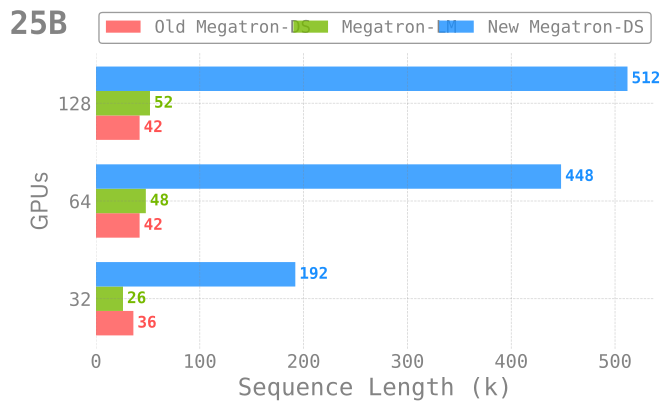
GPT-25B Model

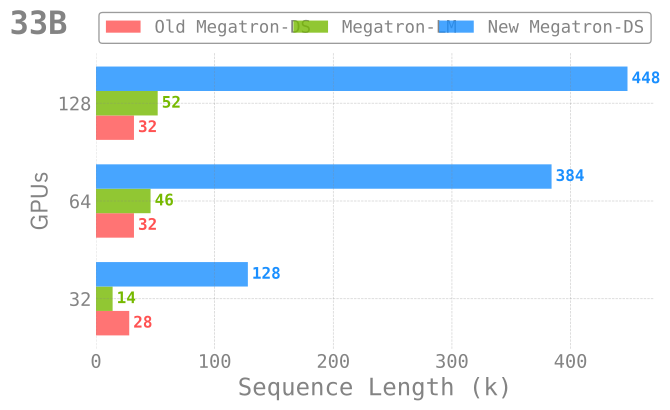
GPT-33B Model

Figure 2: Pre-training with long sequence support across different model sizes and numbers of GPUs. In each case, the new (current) implementation significantly outperforms both NVIDIA/Megatron-LM as well as our previous implementation.

Installation

Using install.sh

Installation

Important
To install, simply:

git clone https://github.com/ramanthanlab/GenSLM/
cd GenSLM/examples/long-sequences/
./install.sh

Explicitly, ./install.sh will:

  1. Automatically create a virtual environment on top of the latest conda module
  2. Install (+ update2) / build all the required dependencies into this virtual environment

Step-by-Step

For completeness, we describe below the steps for installing and building each of the dependencies.

  1. Clone GitHub repo:

    git clone https://github.com/ramanthanlab/GenSLM
  2. Load conda module:

    • ThetaGPU:

      # ThetaGPU:
      if [[ "$(hostname)==theta*" ]]; then
          export MACHINE="ThetaGPU"
          export CONDA_DATE="2023-01-10"
          module load conda/2023-01-11
          conda activate base
      fi
    • Polaris:

      # Polaris:
      if [[ "$(hostname)==x3*" ]]; then
          export MACHINE="Polaris"
          export CONDA_DATE="2023-01-10"
          module load conda/2023-01-10-unstable
          conda activate base
      fi
  3. Setup Virtual Environment3:

    cd ./genslm/examples/long-sequences
    # create a new virtual environment
    mkdir -p "venvs/${MACHINE}/${CONDA_DATE}"
    python3 -m venv "venvs/${MACHINE}/${CONDA_DATE}" --system-site-packages
    source "venvs/${MACHINE}/${CONDA_DATE}/bin/activate"
  4. Create a new folder (genslm/examples/long-sequences/deps/${MACHINE}) where we’ll installing dependencies locally:

    mkdir -p "deps/${MACHINE}"
    cd "deps/${MACHINE}"

Dependencies

We provide below the details needed to install each of the required dependencies.

saforem2/ezpz
  1. saforem2/ezpz

    pip install -e "git+https://github.com/saforem2/ezpz.git#egg=ezpz"
Microsoft/DeepSpeed
  1. Microsoft/DeepSpeed

    git clone https://github.com/microsoft/DeepSpeed.git
    cd DeepSpeed
    python3 -m pip install -e .
Microsoft/Megatron-DeepSpeed
  1. Microsoft/Megatron-DeepSpeed:

    git clone https://github.com/microsoft/Megatron-DeepSpeed.git
NVIDIA/apex
  1. NVIDIA/apex

    git clone https://github.com/NVIDIA/apex
    cd ../apex/
    pip install -v --disable-pip-version-check --no-cache-dir --no-build-isolation --global-option="--cpp_ext" --global-option="--cuda_ext" -e ./
pybind/PyBind11
  1. pybind/PyBind11

    pip install pybind11
Dao-AILab/flash-attention
  1. Dao-AILab/flash-attention:

    Flash Attention
    • The new release supports three different implementations of FlashAttention: (v1.0.4, v2.x, triton)
    • FlashAttention v2.x may have numerical instability issues. For the best performance, we recommend using FlashAttention + Triton
    • v1.0.4:

      python3 -m pip install flash-attn==1.0.4
    • v2.x:

      git clone https://github.com/Dao-AILab/flash-attention
      cd flash-attention
      python3 setup.py install
    • openai/triton:

      git clone -b legacy-backend https://github.com/openai/triton
      cd triton/python
      python3 -m pip install cmake
      python3 -m pip install .

Running

The ALCF/ directory contains shell scripts for setting up the environment and specifying the options to be used when launching.

Various options can be specified dynamically at runtime by setting them in your environment, e.g.:

MODEL_SIZE_KEY="GPT25B" SEQ_LEN=128000 USE_FLASH_ATTN=1 MICRO_BATCH=1 GAS=1 SP_TYPE="megatron" ZERO_STAGE=1 ./ALCF/train-gpt3.sh

Explicitly:

  • ALCF/train-gpt3.sh: Main entry point for training
    • This script will automatically source the rest of the required ALCF/*.sh scripts below
  • ALCF/models.sh: Contains some example model architectures for GPT3-style models
  • ALCF/args.sh: Logic for parsing / setting up runtime options for Megatron and DeepSpeed
  • ALCF/setup.sh: Locate and activate virtual environment to be used, ensure MPI variables are set properly
  • ALCF/launch.sh: Identify available resources and build the command to be executed
    • i.e. figure out how many: {nodes, GPUs per node, GPUs total}, to pass to mpi{run,exec}
    • then, use this to build mpiexec <mpiexec-args> python3 pretrain_gpt.py

ZeRO Offloading

🚀 W&B Report: Looooooooong Sequences

These newly introduced optimizations, in combination with ZeRO-Offload allows us to go even further.

By employing ZeRO-Offloading, we are able to free up additional memory which can be used for even longer sequences.

Though work is still ongoing, this is a promising direction that will allow us to consider significantly larger genomes than previously possible.

We use Weights & Biases to track these experiments, and have aggregated our initial results in the W&B Report below.

We can evaluate the performance of our model by looking at two different metrics for throughput: samples_per_sec and TFLOPS.

Explicitly, we see that we are able to scale up to significantly longer sequences (420k / 128k ~ 3.3x) with only a minimal impact on throughput performance (81 / 105 ~ 77\%)4.

Table 2: Impact on TFLOPS as a function of increasing sequence length. Table from: throughput/TFLOPS

NameSequence Length (k)(seq_len / min_seq_len)TFLOPSTFLOPS (% of peak)
GPT25B4203.2812581.7722577.867
GPT25B4003.12590.6286.297
GPT25B3602.812581.632577.7348
GPT25B3602.812582.682478.7346
GPT25B1921.5115.8228110.2927
GPT25B1281106.672101.5788
GPT25B1281105.014100.00

Figure 3: Weights & Biases Report

Footnotes

  1. The described experiments were performed on 4 NVIDIA DGX A100-40GB nodes, all using TPSIZE=32[^tpsize], connected through 8 HDR InfiniBand (200Gb/s per HDR).

    1. deepspeed-0.10.3
    2. pytorch==2.0.0+cu118
  2. Where "${MACHINE}" \in {"ThetaGPU", "Polaris"} and "${CONDA_DATE}" \in {"2023-01-10", "2023-01-11"}

  3. throughput/TFLOPS

 samf.sh / posts / auroragpt / long-sequences · Top 1:1